How to adjust the feed rate and spindle speed for different tools on a CNC Router?
Leave a message

Hey there, fellow CNC enthusiasts! As a supplier of CNC routers, I've seen firsthand how crucial it is to get the feed rate and spindle speed just right for different tools. It can make or break your project, whether you're a hobbyist creating custom pieces or a professional running a production line. In this blog, I'll share some tips on how to adjust these settings for various tools on a CNC router.
Understanding Feed Rate and Spindle Speed
Before we dive into the details, let's quickly go over what feed rate and spindle speed are. The feed rate is how fast the cutting tool moves across the material, usually measured in inches per minute (IPM) or millimeters per minute (mm/min). The spindle speed, on the other hand, is how fast the cutting tool rotates, measured in revolutions per minute (RPM).
Getting the right combination of feed rate and spindle speed is essential for several reasons. It affects the quality of the cut, the lifespan of the tool, and the overall efficiency of your CNC router. If the feed rate is too high, the tool may break or cause a poor-quality cut. If it's too low, you'll waste time. Similarly, if the spindle speed is too high, the tool can overheat and wear out quickly. If it's too low, the cut may not be clean.
Adjusting for Different Tools
End Mills
End mills are one of the most commonly used tools in CNC routing. They come in various shapes and sizes, and the feed rate and spindle speed settings can vary depending on the material you're cutting and the diameter of the end mill.
For softer materials like wood or plastic, you can generally use a higher feed rate and spindle speed. For example, if you're using a 1/4-inch end mill to cut oak, you might start with a spindle speed of around 10,000 RPM and a feed rate of 60 IPM. As you gain more experience, you can fine-tune these settings based on the results.
When cutting harder materials like aluminum or steel, you'll need to reduce the feed rate and spindle speed to avoid damaging the tool. A 1/4-inch end mill cutting aluminum might work well with a spindle speed of 6,000 RPM and a feed rate of 20 IPM.
Drill Bits
Drill bits are used for creating holes in the material. The feed rate and spindle speed for drill bits depend on the diameter of the bit and the material.
For small drill bits (less than 1/8 inch), you can use a relatively high spindle speed, around 15,000 RPM. The feed rate should be slow to ensure a clean hole. As the diameter of the drill bit increases, you'll need to reduce the spindle speed and increase the feed rate slightly.


When drilling through hard materials, such as stainless steel, you'll need to use a lower spindle speed and a slower feed rate. A 1/4-inch drill bit in stainless steel might require a spindle speed of 3,000 RPM and a feed rate of 5 IPM.
Engraving Bits
Engraving bits are used for creating detailed designs on the surface of the material. They are usually smaller in diameter and require a high spindle speed for a smooth finish.
For brass or other soft metals, an engraving bit might work well with a spindle speed of 18,000 RPM and a feed rate of 10 IPM. If you're interested in a Brass Nameplate Engraving Machine, it's designed to handle these types of engraving tasks with precision.
When engraving on harder materials like stone or glass, you'll need to adjust the settings accordingly. A lower feed rate and a slightly reduced spindle speed will help prevent the bit from breaking.
Factors to Consider
Material Hardness
As mentioned earlier, the hardness of the material is a significant factor in determining the feed rate and spindle speed. Softer materials can generally tolerate higher speeds and feed rates, while harder materials require more conservative settings.
Tool Diameter
The diameter of the tool also plays a role. Larger tools usually require lower spindle speeds and higher feed rates compared to smaller tools. This is because larger tools have more surface area in contact with the material, which can generate more heat and stress.
Depth of Cut
The depth of cut affects the feed rate and spindle speed as well. A deeper cut requires a slower feed rate to ensure the tool can remove the material effectively without overloading. You may also need to reduce the spindle speed slightly to prevent the tool from overheating.
Testing and Fine-Tuning
The best way to find the optimal feed rate and spindle speed for your specific project is through testing. Start with the recommended settings based on the tool and material, and then make small adjustments to see how the cut quality improves or deteriorates.
Keep a record of your settings and the results. This will help you build a database of optimal settings for different tools and materials, which you can refer to in future projects.
Using a 3D 4040 CNC Router Machine With Rotary
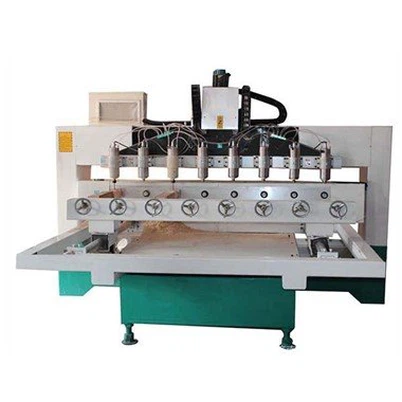
If you're using a 3d 4040 Cnc Router Machine With Rotary, the feed rate and spindle speed settings can be adjusted to take advantage of its unique capabilities. The rotary axis allows you to work on cylindrical or spherical objects, which may require different settings depending on the orientation and shape of the piece.
When working with the rotary axis, you'll need to consider the additional movement and the way the tool interacts with the curved surface. You may need to reduce the feed rate slightly to ensure a smooth cut around the curve.
4 Axis Swing Head CNC Router Machine
The 4 Axis Swing Head CNC Router Machine offers even more flexibility in terms of tool orientation. This can be useful for complex projects that require cutting at different angles.
When using the swing head feature, you'll need to adjust the feed rate and spindle speed based on the angle of the cut. A steeper angle may require a slower feed rate to prevent the tool from binding or breaking.
Conclusion
Adjusting the feed rate and spindle speed for different tools on a CNC router is a skill that takes time and practice to master. By understanding the factors that affect these settings and conducting thorough testing, you can achieve high-quality cuts and extend the lifespan of your tools.
If you're in the market for a CNC router or need more advice on setting up your machine, don't hesitate to reach out. We're here to help you get the most out of your CNC routing experience. Whether you're a beginner or an experienced pro, we can provide the support and guidance you need to succeed.
References
- CNC Router User Manuals
- Machining Handbook
- Online Forums for CNC Enthusiasts