How to change the tool on a CNC Router automatically?
Leave a message

Hey there, fellow CNC enthusiasts! As a supplier of top - notch CNC routers, I'm super excited to dive into the topic of how to change the tool on a CNC router automatically. It's a game - changer in the CNC world, and I'm here to break it down for you.
Why Automatic Tool Changing?
First off, let's talk about why automatic tool changing is such a big deal. In the traditional CNC machining process, manual tool changing can be a real pain. It's time - consuming, error - prone, and can really slow down your production. Imagine having to stop your machine every time you need to switch a tool, adjust it, and then restart the operation. That's a lot of wasted time and energy!
With automatic tool changing, your CNC router can swap out tools in a matter of seconds. This means you can run longer, more complex jobs without any human intervention. It boosts efficiency, reduces downtime, and allows you to take on more challenging projects with ease. Whether you're working on small, delicate pieces or large - scale production runs, an automatic tool - changing system is a must - have.
Understanding the Components
To change tools automatically on a CNC router, you need to understand the key components involved. The main parts include the tool magazine, the tool changer mechanism, and the control system.
The tool magazine is like a storage unit for all your tools. It can hold multiple tools, usually ranging from 8 to 32 or even more, depending on the model of your CNC router. Different types of tool magazines are available, such as carousel - style and linear - style magazines. The carousel - style magazine rotates to present the required tool, while the linear - style magazine moves tools in a straight line.
The tool changer mechanism is responsible for physically swapping the tools between the spindle and the tool magazine. There are several types of tool - changer designs, like the arm - type and the rack - and - pinion type. The arm - type tool changer uses a robotic arm to pick up and insert tools, while the rack - and - pinion type uses a mechanical system to move the tools.


The control system is the brain of the operation. It manages the entire tool - changing process, from determining which tool is needed to coordinating the movement of the tool magazine and the tool changer. The control system communicates with your CNC software, which generates the tool - changing commands based on your machining program.
Setting Up the Automatic Tool - Changing System
Now that you know the components, let's talk about setting up the automatic tool - changing system on your CNC router.
- Tool Loading: First, you need to load all your tools into the tool magazine. Make sure to install each tool securely, following the manufacturer's instructions. Label the tools if necessary to keep track of them easily.
- Tool Offset Measurement: Measure the tool offsets for each tool in your magazine. Tool offsets are important because they tell the CNC machine the exact position and length of each tool. This ensures that the machine can make accurate cuts with every tool. You can use a tool setter to measure the offsets quickly and accurately.
- Programming the Tool Changes: Next, you'll need to program the tool - changing commands into your CNC software. Most modern CNC software allows you to easily specify when and which tool changes are required during the machining process. You can set up a tool - change sequence based on different machining operations, such as roughing, finishing, and drilling.
- Testing the System: Once you've programmed the tool changes, it's time to test the system. Run a simple test program that includes a few tool changes to make sure everything is working correctly. Check for any errors, such as tool - clamping issues or incorrect tool selection.
Troubleshooting Common Issues
Even with a well - set - up automatic tool - changing system, you might encounter some issues from time to time. Here are some common problems and how to fix them:
- Tool Clamping Problems: If a tool is not clamping properly, it could be due to a dirty or worn - out tool holder. Clean the tool holder and the tool shank, and if necessary, replace the tool holder.
- Incorrect Tool Selection: If the wrong tool is being selected, check your CNC program to make sure the tool - change commands are correct. You might also need to check the tool - magazine indexing to ensure that the magazine is presenting the correct tool.
- Tool - Changer Malfunction: If the tool - changer mechanism is not working correctly, it could be a mechanical or electrical issue. Check for loose connections, damaged parts, or any signs of wear and tear. If you're not sure how to fix it, it's best to contact a professional technician.
Our CNC Router Offerings
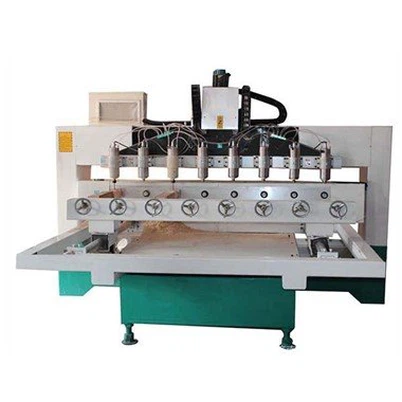
At our company, we offer a wide range of CNC routers with automatic tool - changing capabilities. For example, our 4 Axis Swing Head CNC Router Machine is perfect for complex 3D machining projects. It comes with a high - capacity tool magazine and a reliable tool - changer system, allowing you to switch between tools quickly and efficiently.
If you're into metal engraving, our Brass Nameplate Engraving Machine is a great choice. It can handle different types of metal tools and offers precise tool - changing functionality, ensuring high - quality engraving results.
And for those who need a more compact solution, our 4040 4 Axis Cnc Router Machine is a fantastic option. Despite its small size, it still has an automatic tool - changing feature, making it suitable for small - scale production and prototyping.
Contact Us for Procurement
If you're interested in improving your manufacturing process with CNC routers that have automatic tool - changing capabilities, we're here to help. We can provide you with detailed product information, technical support, and competitive pricing. Whether you're a small - business owner looking to upgrade your equipment or a large - scale manufacturer seeking more efficient solutions, we've got the right CNC router for you. Reach out to us to start discussing your needs and let's work together to take your machining projects to the next level.
References
- "CNC Programming Handbook", Author Unknown, Publisher Unknown
- "Automatic Tool Changing Systems in CNC Machining", Various Industry Articles