How to check the alignment of ATC Wood CNC Router?
Leave a message

Hey there! As a supplier of ATC Wood CNC Routers, I know how crucial it is to keep your machine in top - notch condition. One of the most important aspects of maintaining an ATC Wood CNC Router is checking its alignment. In this blog, I'll walk you through how to do just that.
Why Alignment Matters
First off, let's talk about why alignment is so important. When your ATC Wood CNC Router is properly aligned, it can cut with precision. This means that the finished products will have the right dimensions and smooth edges. Misaligned routers can lead to uneven cuts, which is a big no - no if you're looking to produce high - quality woodwork. It can also cause excessive wear and tear on the router bits and other components, shortening the lifespan of your machine.
Tools You'll Need
Before you start checking the alignment, gather the necessary tools. You'll need a precision straightedge, a dial indicator, and a set of feeler gauges. These tools are relatively inexpensive and can be found at most hardware stores. Having the right tools will make the alignment process much easier and more accurate.
Checking the X - Axis Alignment
Let's start with the X - axis. The X - axis is the one that moves the router left and right. To check its alignment, first, turn off the machine and unplug it for safety. Place the precision straightedge along the X - axis rails. Make sure it's as straight as possible.
Next, use the dial indicator. Mount it on the router head and set the probe against the straightedge. Slowly move the router head along the X - axis. As you move it, watch the dial indicator. If the reading on the indicator changes significantly, it means the X - axis is misaligned.
You can use the feeler gauges to measure the gap between the straightedge and the X - axis components. If the gap is too large in some areas, you'll need to adjust the X - axis. This might involve loosening some bolts, moving the components slightly, and then tightening the bolts again. It's a delicate process, so take your time.
Checking the Y - Axis Alignment
The Y - axis moves the router forward and backward. Similar to the X - axis check, place the straightedge along the Y - axis rails. Mount the dial indicator on the router head and set the probe against the straightedge.
Move the router head along the Y - axis and monitor the dial indicator. Any large fluctuations in the reading indicate misalignment. Use the feeler gauges to measure the gaps and make the necessary adjustments. Sometimes, a small misalignment in the Y - axis can result in diagonal cuts that are off, so it's important to get it right.
Checking the Z - Axis Alignment
The Z - axis controls the up - and - down movement of the router. For this check, you'll need to use a vertical straightedge. Place it next to the Z - axis column. Mount the dial indicator on the router spindle and set the probe against the straightedge.
Slowly move the router spindle up and down along the Z - axis. Observe the dial indicator. If there are variations in the reading, the Z - axis is misaligned. You may need to adjust the Z - axis by loosening and tightening the relevant bolts to correct the alignment. A misaligned Z - axis can lead to inconsistent cutting depths, which is a major issue when working on wood projects.
Checking the Spindle Alignment
The spindle is where the router bit is mounted. To check its alignment, you can use a spindle alignment tool. First, make sure the spindle is clean and free of any debris. Insert the alignment tool into the spindle.
The tool will have markings or indicators. Check if the spindle is centered and vertical. If it's not, you'll need to make adjustments. This may involve adjusting the spindle mounting brackets. A misaligned spindle can cause the router bit to cut unevenly and can also lead to premature bit wear.
Regular Checks and Maintenance
Alignment isn't a one - time thing. You should check the alignment of your ATC Wood CNC Router regularly. I recommend doing a basic alignment check at least once a month, especially if you use the machine frequently.
Regular maintenance also includes cleaning the rails, lubricating the moving parts, and checking the belts and pulleys. Keeping your machine clean and well - lubricated can prevent misalignment in the first place.
Troubleshooting Alignment Issues
Sometimes, even after checking and adjusting the alignment, you may still face issues. If you notice that the cuts are still off, it could be due to other factors. For example, the router bit might be dull or damaged. Replace the bit and see if the problem persists.
Another possible issue could be a software problem. Check the CNC control software to make sure the settings are correct. Sometimes, a simple software update can fix alignment - related problems.


Benefits of Proper Alignment
When your ATC Wood CNC Router is properly aligned, you'll notice a significant improvement in the quality of your woodworking projects. The cuts will be cleaner, and the finished products will have a professional look. You'll also save money in the long run by reducing the wear and tear on the router bits and other components.
If you're in the business of woodworking, having a well - aligned CNC router can give you a competitive edge. Your customers will be more satisfied with the quality of your products, which can lead to more business opportunities.
Our 1325 Model Cnc Router Machine
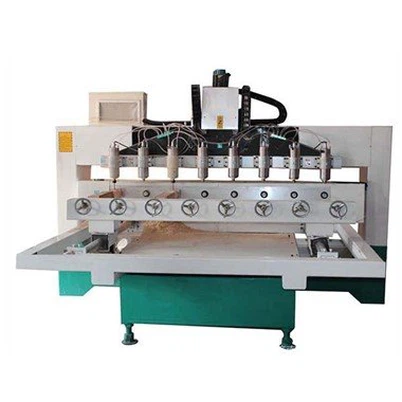
If you're in the market for a new ATC Wood CNC Router or looking to upgrade your current one, check out our 1325 Model Cnc Router Machine. It's a high - performance machine that's designed for precision woodworking. With proper alignment and maintenance, this machine can help you take your woodworking projects to the next level.
Contact Us for More Information
If you have any questions about checking the alignment of your ATC Wood CNC Router or if you're interested in purchasing one of our machines, don't hesitate to reach out. We're here to help you get the most out of your woodworking experience. Whether you're a professional woodworker or a hobbyist, our team can provide you with the support and advice you need.
In conclusion, checking the alignment of your ATC Wood CNC Router is a vital part of machine maintenance. By following the steps outlined in this blog, you can ensure that your machine is cutting with precision and producing high - quality woodwork. So, take the time to check the alignment regularly and keep your router in great shape.
References
- "CNC Router Maintenance Guide" - General woodworking industry publication
- "Precision Machining Handbook" - A technical guide for machine alignment and operation