How to measure the accuracy of a CNC router?
Leave a message

Hey there! As a supplier of CNC routers, I often get asked about how to measure the accuracy of these machines. It's a crucial aspect, especially for those in woodworking, metalworking, and other industries that rely on precise cuts and engravings. In this blog, I'll share some insights on how you can measure the accuracy of a CNC router.
Understanding the Basics of CNC Router Accuracy
Before we dive into the measurement methods, let's quickly understand what we mean by the accuracy of a CNC router. Accuracy refers to how closely the machine can follow the programmed path and produce the desired dimensions. It's affected by various factors, including the quality of the machine's components, the control system, and the environment in which it operates.
Measuring Linear Accuracy
One of the primary ways to measure the accuracy of a CNC router is by checking its linear accuracy. This involves measuring how accurately the machine can move in a straight line along its axes (X, Y, and Z).
Using a Dial Indicator
A dial indicator is a handy tool for measuring linear accuracy. Here's how you can use it:
- Mount the Dial Indicator: First, mount the dial indicator on a stable fixture near the machine's table. Make sure it's securely attached and that the probe can touch the moving part of the machine.
- Zero the Indicator: Move the machine to a starting point and zero the dial indicator. This will give you a reference point for your measurements.
- Move the Machine: Program the machine to move a specific distance along one of its axes. For example, you can program it to move 100 mm.
- Take Measurements: As the machine moves, the dial indicator will show any deviations from the programmed path. Take note of the maximum and minimum readings on the indicator.
- Calculate the Error: Subtract the minimum reading from the maximum reading to get the total error. Divide this error by the programmed distance (in this case, 100 mm) and multiply by 100 to get the percentage error.
For example, if the maximum reading on the dial indicator is 0.05 mm and the minimum reading is 0.01 mm, the total error is 0.04 mm. The percentage error would be (0.04 / 100) x 100 = 0.04%.
Using a Laser Interferometer
A laser interferometer is a more advanced tool for measuring linear accuracy. It uses laser light to measure the distance traveled by the machine with high precision. Here's how it works:
- Set Up the Interferometer: Mount the laser interferometer on a stable surface near the machine. Make sure it's aligned with the axis you want to measure.
- Attach the Retroreflector: Attach a retroreflector to the moving part of the machine. The retroreflector reflects the laser light back to the interferometer.
- Take Measurements: Program the machine to move a specific distance along the axis. As the machine moves, the interferometer will measure the distance traveled by the retroreflector and compare it to the programmed distance.
- Analyze the Data: The interferometer will provide a detailed report of the machine's accuracy, including any errors and deviations from the programmed path.
Using a laser interferometer can give you more accurate and detailed measurements than a dial indicator, but it's also more expensive and requires more technical expertise to operate.
Measuring Angular Accuracy
In addition to linear accuracy, it's also important to measure the angular accuracy of a CNC router. This is especially important for machines that are used for cutting or engraving at different angles.
Using a Protractor
A protractor is a simple tool for measuring angular accuracy. Here's how you can use it:
- Mark a Reference Line: Mark a reference line on the machine's table or workpiece. This will give you a starting point for your measurements.
- Program the Machine: Program the machine to rotate a specific angle. For example, you can program it to rotate 45 degrees.
- Measure the Angle: Use a protractor to measure the actual angle of the machine's rotation. Compare this angle to the programmed angle to determine the error.
- Calculate the Error: Subtract the actual angle from the programmed angle to get the error. Divide this error by the programmed angle and multiply by 100 to get the percentage error.
For example, if the programmed angle is 45 degrees and the actual angle is 44.5 degrees, the error is 0.5 degrees. The percentage error would be (0.5 / 45) x 100 = 1.11%.
Using a Digital Angle Gauge
A digital angle gauge is a more accurate and convenient tool for measuring angular accuracy. It uses electronic sensors to measure the angle with high precision. Here's how you can use it:
- Place the Angle Gauge: Place the digital angle gauge on the machine's table or workpiece. Make sure it's level and aligned with the axis you want to measure.
- Zero the Gauge: Press the zero button on the angle gauge to set it to zero. This will give you a reference point for your measurements.
- Program the Machine: Program the machine to rotate a specific angle. As the machine rotates, the angle gauge will show the actual angle of rotation.
- Analyze the Data: Compare the actual angle shown on the angle gauge to the programmed angle to determine the error. The angle gauge may also provide a digital readout of the error.
Factors Affecting CNC Router Accuracy
There are several factors that can affect the accuracy of a CNC router. Here are some of the most common ones:


Machine Quality
The quality of the machine's components, such as the motors, bearings, and linear guides, can have a significant impact on its accuracy. Higher-quality components generally result in better accuracy.
Control System
The control system of the CNC router is responsible for interpreting the programmed instructions and controlling the movement of the machine. A more advanced control system can provide better accuracy and precision.
Environmental Conditions
The environment in which the CNC router operates can also affect its accuracy. Factors such as temperature, humidity, and vibration can cause the machine to expand or contract, which can lead to errors in the cutting or engraving process.
Tooling
The quality and condition of the cutting tools used in the CNC router can also affect its accuracy. Dull or worn-out tools can cause rough cuts and inaccurate dimensions.
Improving CNC Router Accuracy
If you find that your CNC router's accuracy is not up to par, there are several steps you can take to improve it:
Calibrate the Machine
Regularly calibrating the CNC router can help ensure its accuracy. This involves adjusting the machine's components and settings to match the programmed instructions.
Upgrade the Components
Upgrading the machine's components, such as the motors, bearings, and linear guides, can improve its accuracy and performance.
Control the Environment
Controlling the environment in which the CNC router operates can help reduce the effects of temperature, humidity, and vibration. This can be done by using air conditioning, dehumidifiers, and vibration isolation pads.
Use High-Quality Tooling
Using high-quality cutting tools and regularly replacing them can help ensure accurate cuts and dimensions.
Conclusion
Measuring the accuracy of a CNC router is an important step in ensuring its performance and quality. By using the methods and tools described in this blog, you can accurately measure the linear and angular accuracy of your machine and identify any areas that need improvement.
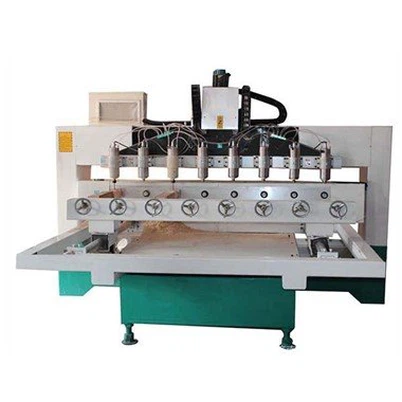
If you're in the market for a high-quality CNC router, check out our 2030 Wood Cnc Engraving Machine. It's designed to provide precise cuts and engravings with high accuracy.
If you have any questions or would like to discuss your CNC router needs, feel free to reach out. We're here to help you find the right machine for your business.
References
- "CNC Router Accuracy: How to Measure and Improve It." Woodworking Network.
- "Measuring the Accuracy of a CNC Machine." Modern Machine Shop.
- "Factors Affecting CNC Router Accuracy." CNC Zone.