What causes the Mini CNC Router to stop working suddenly?
Leave a message

Hey there! As a supplier of Mini CNC Routers, I've seen my fair share of issues with these nifty machines. One of the most frustrating problems for users is when their Mini CNC Router suddenly stops working. It can throw a real wrench in your projects, right? Well, in this blog, I'm gonna break down the possible causes behind this sudden shutdown and give you some insights on how to troubleshoot.
Power - Related Issues
Let's start with the most basic thing: power. You'd be surprised how often a power problem is the culprit. First off, check if the router is properly plugged in. Sounds simple, but it happens! Sometimes, the plug can come loose over time, especially if the machine vibrates a lot during operation. Make sure the power cord is securely connected to both the router and the power outlet.
Another thing to look at is the power supply itself. A faulty power adapter can lead to inconsistent power delivery, which might cause the router to shut down unexpectedly. If you suspect the power adapter is the problem, you can try using a different one (as long as it has the correct voltage and amperage). You can also use a multimeter to test the output of the power adapter. If it's not providing the right amount of power, it's time to replace it.
Software Glitches
Software plays a huge role in the operation of Mini CNC Routers. Sometimes, a glitch in the control software can cause the machine to stop working. This could be due to a bug in the software itself, or it might be a compatibility issue with your computer's operating system.
One common fix for software glitches is to restart the control software. Sometimes, just closing and reopening the program can clear up any temporary issues. If that doesn't work, try restarting your computer. This can also help reset any background processes that might be interfering with the software.
If the problem persists, you might need to update the control software. Manufacturers often release updates to fix bugs and improve performance. Check the manufacturer's website for the latest version of the software and follow the instructions to install it.
Overheating
Mini CNC Routers generate a fair amount of heat during operation, especially if they're running for long periods or doing heavy - duty tasks. Overheating can cause the machine to shut down as a safety measure to prevent damage.
To check if overheating is the problem, feel the temperature of the router's components, such as the motors and the control board. If they're extremely hot to the touch, overheating is likely the culprit. Make sure the router has proper ventilation. It should be placed in an open area with enough space around it for air to circulate. You can also use a small fan to blow air over the machine to help dissipate heat.
Some routers come with built - in cooling systems, like heat sinks or fans. Check if these are working properly. If a fan is not spinning, it might be clogged with dust or debris. You can clean the fan gently with compressed air to remove any dirt.
Mechanical Problems
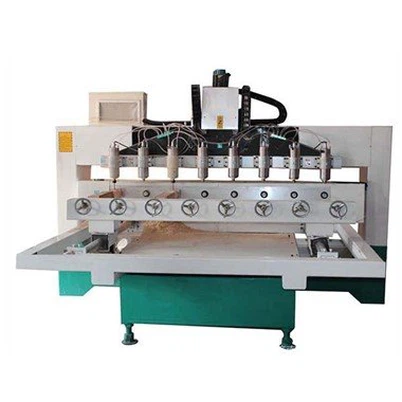
Mechanical issues can also cause a Mini CNC Router to stop working. One common problem is a jammed or stuck moving part. This could be due to debris getting into the machine's tracks or gears, or it could be a sign of wear and tear on the mechanical components.
Inspect the router's moving parts, such as the X, Y, and Z axes. Look for any signs of debris, like sawdust or small pieces of material. If you find any, carefully remove it using a brush or compressed air. You can also check the belts and pulleys for signs of damage or looseness. A loose belt can cause the machine to lose its accuracy and might even cause it to stop working. Tighten or replace the belts if necessary.
Another mechanical issue could be a problem with the spindle. The spindle is responsible for rotating the cutting tool, and if it fails, the router won't be able to cut. Check if the spindle is spinning freely. If it's stuck, there might be a problem with the bearings or the motor. In this case, you might need to replace the spindle or have it repaired by a professional.
Connection Problems
The connection between the Mini CNC Router and your computer is crucial for its operation. If there's a problem with the connection, the router might stop receiving commands from the software and shut down.
First, check the USB or Ethernet cable that connects the router to your computer. Make sure it's securely plugged in at both ends. You can also try using a different cable to see if that solves the problem.


If you're using a wireless connection, check the signal strength. A weak wireless signal can cause intermittent communication issues. Try moving the router closer to the router or access point, or try resetting the wireless network.
Material - Related Issues
Believe it or not, the material you're using can also cause problems for your Mini CNC Router. If the material is too hard or thick for the router's capabilities, it can put too much stress on the machine and cause it to stop working.
Make sure you're using the right cutting tools for the material you're working with. Different materials require different types of bits and cutting speeds. Refer to the manufacturer's guidelines for the recommended settings for your specific material.
Also, check the material for any defects or irregularities. A knot in a piece of wood or a hard spot in a plastic sheet can cause the cutting tool to bind and stop the machine.
Electrical Interference
Electrical interference from other devices can also affect the operation of your Mini CNC Router. If there are other electrical devices nearby, such as motors, generators, or even fluorescent lights, they can emit electromagnetic waves that interfere with the router's control signals.
Try moving the router away from other electrical devices. You can also use shielded cables to reduce the effects of electrical interference. Some routers come with built - in shielding to protect against interference, but if you're still having problems, additional shielding might be necessary.
In conclusion, there are many possible causes for a Mini CNC Router to stop working suddenly. By checking the power supply, software, temperature, mechanical components, connections, materials, and for electrical interference, you can usually diagnose and fix the problem.
If you're in the market for a new Mini CNC Router, we have some great options. Check out our 4040 Model Advertising Engraving Machine and 4040 4 Axis Cnc Router Machine. These machines are reliable and offer great performance for a variety of applications.
If you have any questions or are interested in purchasing a Mini CNC Router, don't hesitate to reach out to us. We're here to help you find the perfect machine for your needs.
References
- General knowledge and experience as a Mini CNC Router supplier
- Manufacturer's manuals and technical documentation for Mini CNC Routers