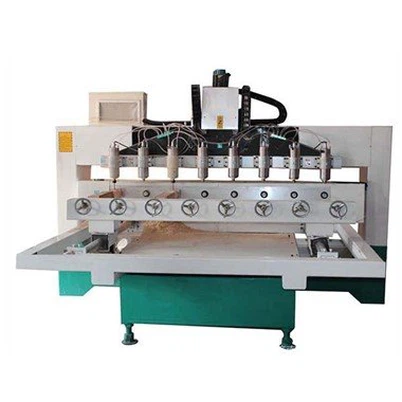
How to clean a 4 Axis CNC Router?
Leave a message

Hey there, fellow makers and DIY enthusiasts! As a supplier of 4 Axis CNC Routers, I know firsthand how important it is to keep your machine in top-notch condition. A well-maintained CNC router not only ensures better performance but also extends its lifespan. In this blog post, I'm gonna walk you through the step-by-step process of cleaning a 4 Axis CNC Router.
Why Cleaning Your 4 Axis CNC Router Matters
Before we dive into the cleaning process, let's talk about why it's so crucial to keep your router clean. Over time, dust, debris, and coolant residue can build up on the machine's components. This buildup can cause several issues, such as reduced accuracy, increased wear and tear on parts, and even potential breakdowns. By regularly cleaning your 4 Axis CNC Router, you can prevent these problems and keep your machine running smoothly.
What You'll Need
First things first, let's gather the tools and supplies you'll need for the cleaning process. Here's a list of what you should have on hand:
- Compressed air canister or air compressor
- Soft-bristled brush (like a paintbrush)
- Microfiber cloths
- Isopropyl alcohol (at least 70% concentration)
- Lubricant (specifically designed for CNC routers)
- Safety glasses and gloves
Step 1: Power Down and Unplug
Safety should always be your top priority when working with any machinery. Before you start cleaning your 4 Axis CNC Router, make sure to power it down and unplug it from the electrical outlet. This will prevent any accidental startup and keep you safe from electrical shocks.
Step 2: Remove Loose Debris
Once the machine is powered off, it's time to get rid of the loose debris. Use the compressed air canister or air compressor to blow away any dust, chips, or other particles from the exterior of the router. Pay special attention to the areas around the spindle, the worktable, and the linear guides. You can also use the soft-bristled brush to gently sweep away any stubborn debris that the air couldn't remove.
Step 3: Clean the Worktable
The worktable is where most of the cutting action happens, so it's bound to get dirty. Start by removing any clamps, fixtures, or other accessories from the table. Then, use a microfiber cloth dampened with isopropyl alcohol to wipe down the surface of the worktable. This will help remove any adhesive residue, coolant stains, or other contaminants. Make sure to dry the table thoroughly with a clean microfiber cloth to prevent rusting.
Step 4: Clean the Spindle
The spindle is the heart of your 4 Axis CNC Router, so it needs to be kept clean and well-maintained. Use the compressed air to blow away any dust or debris from the spindle housing. Then, use a microfiber cloth dampened with isopropyl alcohol to gently clean the exterior of the spindle. Be careful not to get any alcohol inside the spindle motor.
Step 5: Clean the Linear Guides and Rails
The linear guides and rails are responsible for the smooth movement of the router's axes. Over time, they can accumulate dirt and debris, which can affect the machine's accuracy. Use the compressed air to blow away any loose debris from the guides and rails. Then, use a microfiber cloth dampened with isopropyl alcohol to clean the surfaces of the guides and rails. Make sure to dry them thoroughly and apply a small amount of lubricant to keep them moving smoothly.
Step 6: Clean the Electronics
The electronics of your 4 Axis CNC Router are sensitive components that need to be handled with care. Use the compressed air to blow away any dust or debris from the control panel, wiring, and other electronic components. Be careful not to get too close to the components with the air stream, as this could damage them. If you notice any signs of corrosion or damage on the electronics, it's best to consult a professional technician.
Step 7: Inspect and Tighten Hardware
While you're cleaning your router, take a few minutes to inspect all the hardware, such as bolts, nuts, and screws. Make sure they are all tightened properly. Loose hardware can cause vibrations and affect the machine's performance. If you find any loose hardware, use the appropriate tools to tighten them.
Step 8: Reassemble and Test
Once you've finished cleaning all the components, it's time to reassemble the router. Put back any clamps, fixtures, or accessories that you removed earlier. Plug in the router and power it on. Run a few test cuts to make sure the machine is working properly. If you notice any issues, such as unusual noises or vibrations, stop the machine immediately and investigate the problem.
Recommended 4 Axis CNC Routers
If you're in the market for a new 4 Axis CNC Router, we've got some great options for you. Check out our 4 Axis RotaryCNC Router, which offers high precision and versatility. Or, if you're looking for a more compact option, our 3d 4040 Cnc Router Machine With Rotary is a great choice. And for those who need a more advanced machine, our 4 Axis Swing Head CNC Router Machine is sure to impress.


Conclusion
Cleaning your 4 Axis CNC Router is an essential part of its maintenance. By following the steps outlined in this blog post, you can keep your machine in excellent condition and ensure optimal performance. Remember, a clean router is a happy router!
If you have any questions about cleaning your 4 Axis CNC Router or if you're interested in purchasing one of our high-quality machines, feel free to reach out to us. We're here to help you with all your CNC routing needs.
References
- Manufacturer's manual for 4 Axis CNC Router
- Online resources on CNC router maintenance