


A CNC router is a type of computer controlled machine created for milling, drilling and cutting materials. CNC routers are similar to milling machines, with some of them capable of performing almost the same tasks. The main functions are to cut, engrave and carve objects out of a work piece, essentially a replacement for the usual hand-held router. By introducing computer control to the process, the number of errors is drastically reduced.
Advantages of Mini CNC Router
Multi-Purpose
The router's ability to cut and engrave without the use of a different tool is a significant advantage. You can precisely and repeatedly cut materials thanks to the repeatability of material shaping. Error and waste frequency are therefore decreased.
It is User-friendly
The toolpath instructions for CNC routers are typically provided by a piece of intermediary software like Vectric Cut2Dpro. However, programmers are still free to use their preferred drawing program. If training has been completed, programming and running the equipment is simple and straightforward.
Safe to Use
Routers emit fewer fumes than many alternative shaping techniques (such as laser engraving). Despite that, they can still generate tons of chippings and dust when cutting. Also, CNC routers often have a dust extraction system fitted to reduce the dust leaving the bed to the surrounding environment. The dust extraction system consists of a filter and an extractor fan.
Precision
With their computer-operated nature, CNC routers deliver better precision and consistency. When you input your design and measurements, the CNC routers can create as many products as you wish. And everything it produces will look the same.
Unlike handheld machines that are prone to errors and inexact cuts, CNC routers are excellently precise and reliable. These machines also help you increase savings since their precision allows for efficiently utilising raw materials on each cut. As a result, you also increase your profit margin.
Flexibility
CNC routers offer unparalleled flexibility. These are capable of drilling and milling various types of materials, including metals. You can use them for creating signs, mouldings, furniture, instruments, and other items we use regularly. The flexibility of CNC routers allow businesses to perform multiple tasks and bring in more businesses.


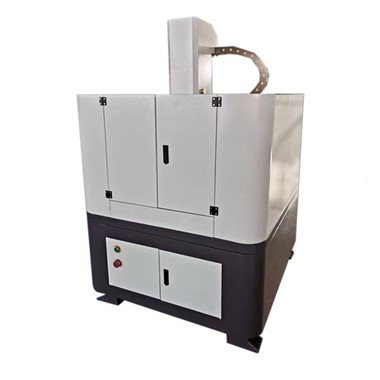

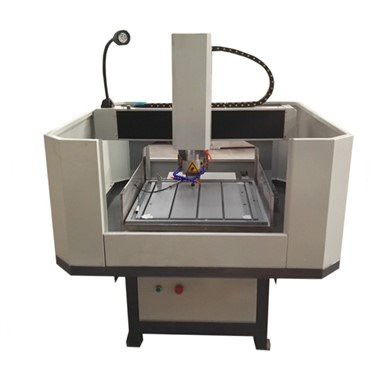
Why Choose US
Our Factory
JINAN ZHONGKE CNC EQUIPMENT CO.,LTD is a professional manufacture of CNC machines for more than 15 years, we have our own workshops , warehouse and sample machine display area.
Our Product
We are located in Jinan City ,Shandong province and is specialized in manufacturing CNC routers, nesting CNC machines, CNC plasma cutting machines, laser cutting machines and engraving machines etc. These machines can be usd for wood furniture making, decoration industry, advertising industry, art field, mold production field, etc. Also have SGS, CE certification, etc.
Professional Team
With an experienced and professional team, we have exported our products to many countries and regions all over the world, especially America, Europe, Oceania and Southeast Asia. At the same time, we have a professional technical team, which can carry out on-site training and after-sales.
Rich Experience
We enjoy a good reputation among our customers. We welcome customers, business associations and friends from all parts of the world to contact us and seek cooperation for mutual benefits.

In its most basic form, a CNC router consists of four components, the work table, spindle, drive system and controller. The work table supports and holds the material while the machine is working. The spindle grabs the tool to do all the cutting, engraving, drilling, milling, and more. The drive system is essentially an arm attached to the spindle that moves it in three directions. The controller directs the arm to move the direction of the spindle.
After the CNC router is started, the drive system allows the spindle to move and machine in three directions along the X, Y, and Z axes. The X axis is left to right, the Y axis is front to back, and the Z axis is top to bottom. This allows the machine to complete some very complex pattern processing and contour cutting more accurately and faster than manual engraving.
The running direction and cutting distance of the machine are commanded by the control system. This
information is provided in digital format, which is then converted into a 2D or 3D image using G-code. Once the image is created, it is sent to a numerically controlled controller, which converts the digital signal into different voltages and currents. This allows the arm to move with high precision, and the machine produces the final product in a short period of time precisely according to the design pattern.
Although this sounds very complicated, in practice, CNC routers are very simple to use. This makes CNC routers very popular in workshops of all sizes. Like other CNC machine applications, CNC routers can produce an exceptional variety of customized parts with precision. Once programmed, a single set of prompts can accomplish three-dimensional cutting tasks for a range of materials. Such ease of operation that automation provides results in increased production capacity, less waste, repeatability, and safety.
Frame
The frame is the CNC router's support. Ideally, the frame of your CNC router should be as stiff as possible. Remember, the cutting tool moves at very aggressive speeds. If the frame isn't stiff enough to hold everything in place, it becomes impossible to achieve precision. A flexible frame leads to various issues, such as cross-bridge flexing, chatter, and displacements on one of the three axes.
Table
Tables differ when it comes to construction and locating systems. The most flexible tables are made with integrated T-slots, vacuum pulldown, or both. These tables allow you to clamp diverse workpieces anywhere.
Tables with aluminum extrusion construction are also quite common in the market. They offer a perfect balance of stiffness, adaptability, and low weight.
You can also make your own T-slot table using a wide range of machined strong materials. The table can have slots on both sides of the axes.
Spindle
The spindle is the heart of the CNC machine and its most crucial component since it plays a major role in the CNC machine's performance. The low-cost spindle construction method is where it's built into the motor shaft and relies on the motor bearings. However, this mechanism leads to premature wear and tear, unless the motor bearings are strengthened.
Spindles/motor bearings have items that require occasional maintenance. Loose bearings result in a loose cutter. Such a cutter has minimal accuracy. On the other hand, stiff bearings make the machine work harder and result in more heat in the process.
Sliding Ways
The sliding ways, also referred to as the ways or slides, are the motion tracks that allow movement in the X-Y-Z axes. The precision of the job and the quality of the final product depends on the sliding ways, frame, and lead screws.
There are several types of sliding ways you'll find in CNC routers. V-grooves use a ball bearing with wheels locked on both sides of the track. These wheels ride on a rail that could be a triangular edge extruding or the edge of an angle iron piece.
The wheel of the V-groove doesn't have to be v-shaped. For example, it could also be cupped to ride on a curved edge or on a round shaft.
While V-grooves are the cheapest, they're also the most prone to backlash and the least accurate. They also frequently require adjustment to maintain quality performance.
Round shafts use ball bearings and perform a bit better compared to V-grooves. Linear slides are the highest-performing sliding ways.
Axis Drive
The axis drive system in a CNC router converts the rotary motion produced by the stepper motors to linear motion. Entry-level CNC machines often use toothed axis drives or timing belts for this function. While they may be less ideal, toothed and timing belts can be durable for decades if well maintained.
Dust Collector
A CNC machine doesn't just have to operate. It's also important to ensure the machine keeps running smoothly and safely. That's how you maximize the machine's potential lifespan.
When the machines cut through and shape metal, wood, or plastic, tiny pieces and bits of the material fly in every direction. Since these bits and pieces land anywhere, they can compromise your view of the work being done. This is dangerous since it can lead to injuries.
Scanner
With the right CNC router accessories, it's possible to reverse engineer and create products that are rare to find or currently out of production. A CNC scanner helps you achieve this. A 2D optical scanner is sufficient to convert your CNC router into a reproduction tool.
Tool Holder
CNC machines have cutting tools, such as mills, drill bits, cutters, taps, saws, and engraving tools. For the spindle to control the cutting tool, the tool needs to be held by a tool holder.
A CNC tool holder is the connection between a cutting tool and the spindle. It keeps the tool steady and allows the spindle to execute accurate machining. While they need to grip the tool firmly, some holders allow the tool to “float” to avoid wear and tear to the spindle, tool, or workpiece.
How to Use a CNC Router


Step 1: Starting CNC Router Machine
Before diving into your CNC project, ensure the machine is powered up correctly.
Power On: Turn on the CNC controller box near the wall using the ON/OFF switch.
Remote Controller: Press the green start button to activate the remote controller.
Dust Collector: Switch on the dust collector and check dust bags for proper installation.
Vacuum Table: Start the vacuum table by pushing the white button.
Step 2: Choose End Mill
The router bits you use on your machine are called end mills. They come in several different sizes and shapes, suited to the different projects you're working on. Understanding end mills is crucial for project success. Consider the following when you check the user manual regarding which end mill to use:
Number of Flutes: Four-flute end mills, with more edges, are suitable for harder materials like aluminum, mahogany, and plastics. In contrast, with fewer edges, two-flute end mills excel in softer materials such as MDF, plywood, and cedar.
End Mill Shape: Look for information about flat, ball nose, and V-bits and their specific applications. As a general rule, flat-end mills featuring a flat profile excel in clean cuts, routing pockets, and drilling holes. Ball nose bits with rounded ends are ideal for 3D surfacing but unsuitable for profile cutting. On the other hand, V-bits are distinguished by a pointed tip and are best suited for carving applications, especially for intricate details like engraving text.
Sizing: Selecting the right end mill size is crucial for CNC projects. The size determines the precision and efficiency of your cuts. Larger end mills are robust for heavy material removal, while smaller ones offer intricate detail. Tailoring the size of your project ensures optimal performance and quality results.
Step 3: Choose the Correct End Mill Flutes
Consider the material and project requirements when choosing the right end mill flutes for your CNC router. Four-flute end mills excel in handling harder materials, providing efficient chip evacuation. Two-flute end mills, ideal for softer materials, offer smoother finishes. Matching the flute configuration to your material ensures optimal performance precision and extends tool life.
Step 4: Choose the Correct End Mill Shapes
Explore diverse end mill shapes to enhance CNC router capabilities. Flat-end mills, characterized by a flat profile, are ideal for clean cuts, precise routing, and efficient drilling.
Flat End Mills are Ideal for clean cuts, routing, and drilling.
Ball Nose End Mills: These feature a rounded tip that excels in 3D surfacing, creating smooth, curved surfaces.
V-Bit End Mills: These have a pointed tip and are perfect for intricate carving tasks, especially for detailed engraving or shaping workpieces with varying depths.
Understanding these shapes enables you to select the ideal tool for specific applications, ensuring optimal results in your CNC projects.
Step 5: Changing the Blade or End Mill
You will need to change the blade or end mill depending on the requirements of your project and the material you're working on. If changing the end mill, follow these steps:
Secure Controller: Place the remote controller in the holder without pressing the spindle start button.
Loosen Collet: Carefully loosen the collet from the spindle using two wrenches.
Replace End Mill: Swap the old end mill for the new one, ensuring proper placement.
Tighten: Secure the new end mill into the spindle, avoiding excessive force.
Step 6: Set Up Workpiece On Table
After securing your cutting tools, setting up your table is next. This helps ensure proper setup for cutting your material. Here are a few reminders:
Vacuum Zones: Check and optimize vacuum zones under the MDF for workpiece stability.
Rubber Strips: Place rubber strips around zone edges for effective vacuum strength.
Plastic Plugs: Use plugs for smaller plates, not filling a whole vacuum zone.
Activate Vacuum: Place the workpiece on the MDF, select the desired vacuum zones, and press the white button to activate.
Step 7: Set Up the X and Y Axis
After setting up your work table, you need to set up the coordinates for your machine. Zero in on the X and Y axes using the following steps:
Position Router Bit: Place the router bit over the material's left-back surface.
Zero Setting: Press [XY=0] and [OK] when the new zero position is satisfied.
Step 8: Set Up Z Axis
Establish the Z axis using either the Paper Method or Tool Sensor Method described below:
Paper Method: Place a sheet of A4 paper between the part and the bit, adjusting until the tip touches the paper.
Tool Sensor Method: Use the tool sensor under the router bit, allowing it to set the zero point automatically.
Important Reminder: When changing bits, reset the Z zero coordinate but not the X-Y coordinates.
Step 9: Load Your File
Finally, you must prepare to load the design file that your CNC router machine will use in its operations. Consider the following steps:
Insert the flash drive into the reader.
Wait for the “read USB” message.
Scroll through the USB library to find your file.
Press [OK] to upload and [1] to confirm.
Wear ear protection and goggles.
Press the start [►] button.
After starting, the machine will proceed to work on your material. There will be very little human intervention during the routing phase of the process.

Power-off for Every Router Bit Change
This may seem like overkill at first, but you can't be too careful when handling router bits. All it would take is a second for a bit to do some serious damage while you've got your fingers on it. It only takes a moment to power off the CNC router and then plug it back in once the bit has been changed. That brief moment can make a world of difference when it comes to safety.
Use the Right Router Bit
Be sure to match the bit you use to the work you're doing. Different router bits are used in different marterial. Check the type, strength, diameter and shank length of your bits when selecting one, using the one that is the best fit for the work you're doing. Make sure you only use sharp bits as well; the duller a bit is, the more dangerous it is to work with and the more likely you are to become injured (or at least damage the wood you're working with.)
Match the Speed to Bit Size
Different bit sizes work best at different RPMs, and using the wrong speed for your bit can damage your wood, the bit and possibly your router. Bits come with recommendations for maximum RPMs, and charts are available where you can look up the optimal speed for a wide range of bit diameters.
CNC Router Maintenance Checklist
●Cleaning: Importance and Methods
One of the most crucial daily maintenance tasks is keeping the CNC router clean. Accumulation of dust and debris not only affects the machine's accuracy but can also lead to premature wear of its components. Regular cleaning with compressed air, soft brushes, or specially designed vacuums for electronic equipment helps maintain the router's precision and operational efficiency. Pay special attention to sensitive areas such as the spindle, collets, and guide rails, ensuring they are free from contaminants that could impact performance.
Conducting a basic inspection of the CNC router each day can help identify signs of wear and tear early on. Look for any unusual noises, vibrations, or movements that could indicate a problem. Checking for loose bolts, worn cables, and other signs of physical damage is essential for preventing small issues from becoming major complications. This daily overview helps ensure the machine's components are in good condition and functioning correctly.
●Lubrication: Best Practices and Recommended Products
Lubrication is essential for the smooth operation of moving parts within the CNC router. Weekly or monthly, depending on the manufacturer's recommendations and the intensity of machine use, apply lubricant to parts such as bearings, rails, and lead screws. Use only the lubricants suggested by the manufacturer to avoid any chemical damage or buildup that could impair the machine's function. Proper lubrication reduces friction and wear, extending the lifespan of these critical components.
In addition to daily checks, more detailed inspections should be conducted on a weekly or monthly basis. This involves examining the mechanical and electrical systems more thoroughly for signs of wear or fatigue. Utilize diagnostic software if available, and check for errors in the machine's log. Ensuring that all components are in optimal condition can prevent unexpected failures and costly downtime.
Staying current with software and firmware updates is crucial for the CNC machine's performance and security. Manufacturers often release updates that enhance functionality, introduce new features, or patch known vulnerabilities. Regularly checking for and installing these updates ensures the machine operates with the latest improvements and protections, contributing to its overall reliability and efficiency.
FAQ
We're well-known as one of the leading mini cnc router manufacturers and suppliers in China. Please rest assured to buy high quality mini cnc router for sale here from our factory. For price consultation, contact us.
4040 Model Advertising Engraving Machine, 4040 4 Axis Cnc Router Machine, 6090 cnc router